# OOJU\_P01

{% hint style="info" %}
OOJU P01 Contract: 0xC7292b521540e0Bb3196C3D3737085eE59B36DD3
{% endhint %}

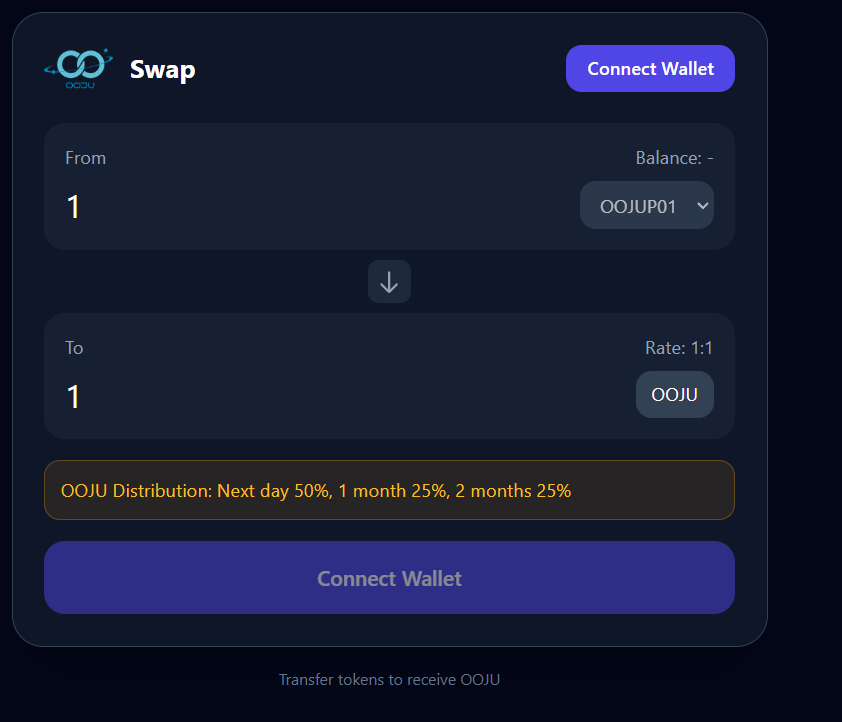
1. Go to <https://oojuswap.oojusales.com/>

   <div align="left"><figure><img src="https://1601025725-files.gitbook.io/~/files/v0/b/gitbook-x-prod.appspot.com/o/spaces%2FpmTmyDG5fXgRWTNXspUU%2Fuploads%2FAHy9pegCESYONG3DmPXF%2Fimage.png?alt=media&#x26;token=52a11776-1538-4fc4-9e7f-a2b0b29932f6" alt="" width="563"><figcaption></figcaption></figure></div>

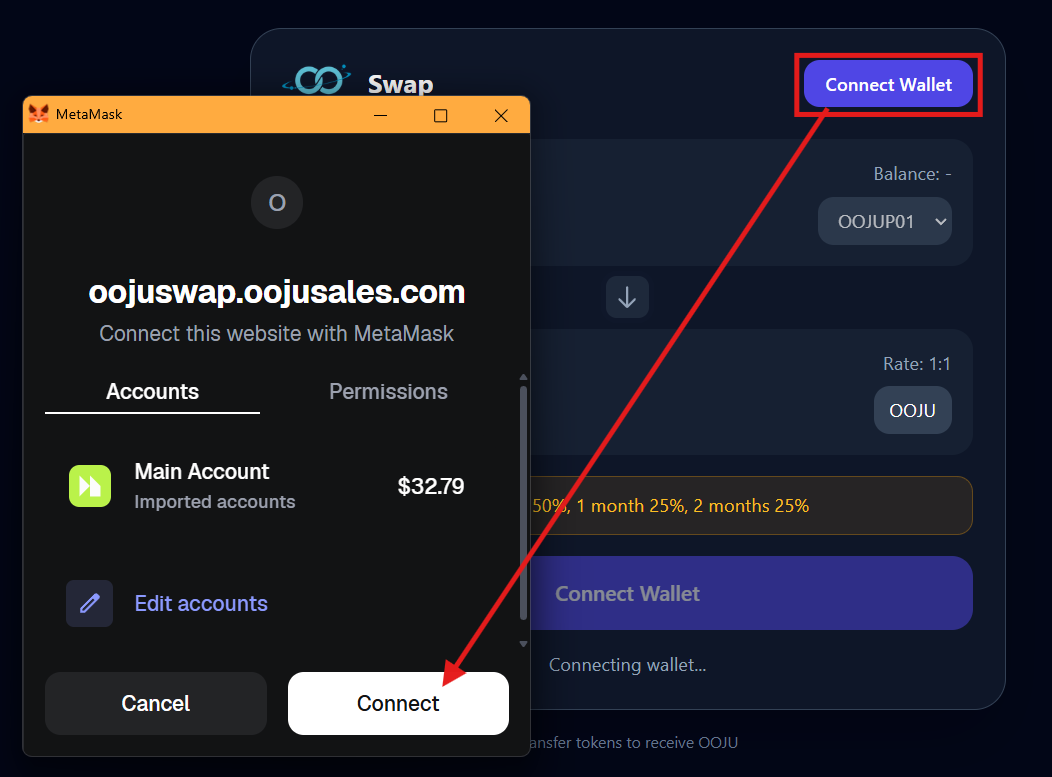
2. Click on "Connect Wallet", once your wallet opens MetaMask click on "Connect'

   <div align="left"><figure><img src="https://1601025725-files.gitbook.io/~/files/v0/b/gitbook-x-prod.appspot.com/o/spaces%2FpmTmyDG5fXgRWTNXspUU%2Fuploads%2FjnZydwFm1Ezn6B4IDrh5%2Fimage.png?alt=media&#x26;token=c153507b-0643-46ad-8688-c9b7706ef47e" alt="" width="563"><figcaption></figcaption></figure></div>

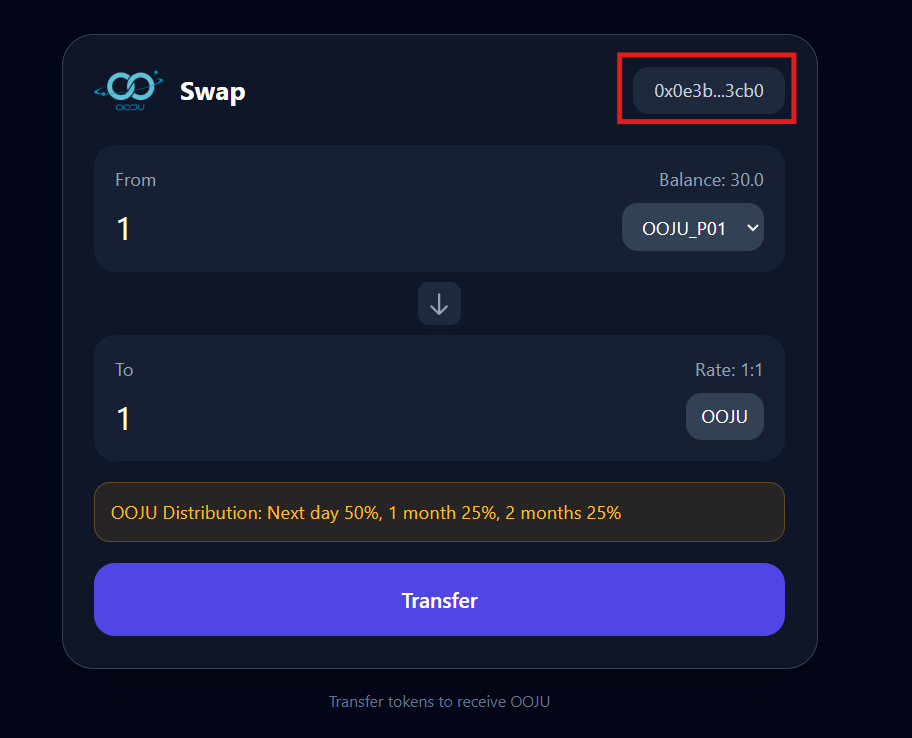
3. Once your wallet is successfully connected your wallet address will be displayed as shown below in the screenshot along with your token balance.

   <div align="left"><figure><img src="https://1601025725-files.gitbook.io/~/files/v0/b/gitbook-x-prod.appspot.com/o/spaces%2FpmTmyDG5fXgRWTNXspUU%2Fuploads%2F6c88nUf6Sl1BBwaSbfhS%2Fimage.png?alt=media&#x26;token=77a39ce3-eeaf-4d2a-9121-fe215280c1aa" alt="" width="563"><figcaption></figcaption></figure></div>

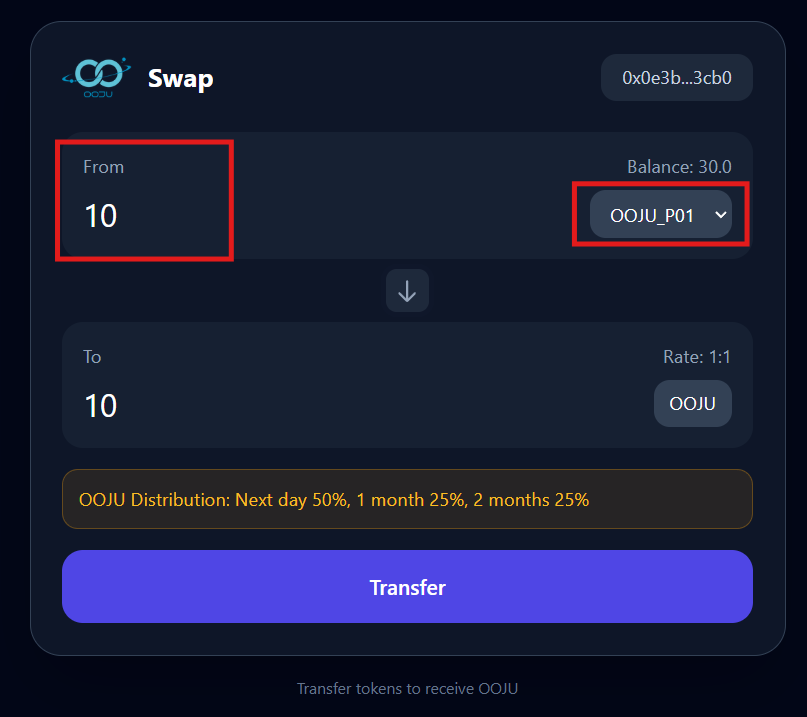
4. Go to "From" and enter the amount of Tokens you'd like to swap to OOJU and then select the token type from the list as shown below. For this example "OOJU\_P01" will be selected.

   <div align="left"><figure><img src="https://1601025725-files.gitbook.io/~/files/v0/b/gitbook-x-prod.appspot.com/o/spaces%2FpmTmyDG5fXgRWTNXspUU%2Fuploads%2FbmClH4xnSdtN7F5jsbhG%2Fimage.png?alt=media&#x26;token=660bc2c6-e65d-4671-9a75-c20cdc348992" alt="" width="563"><figcaption></figcaption></figure></div>

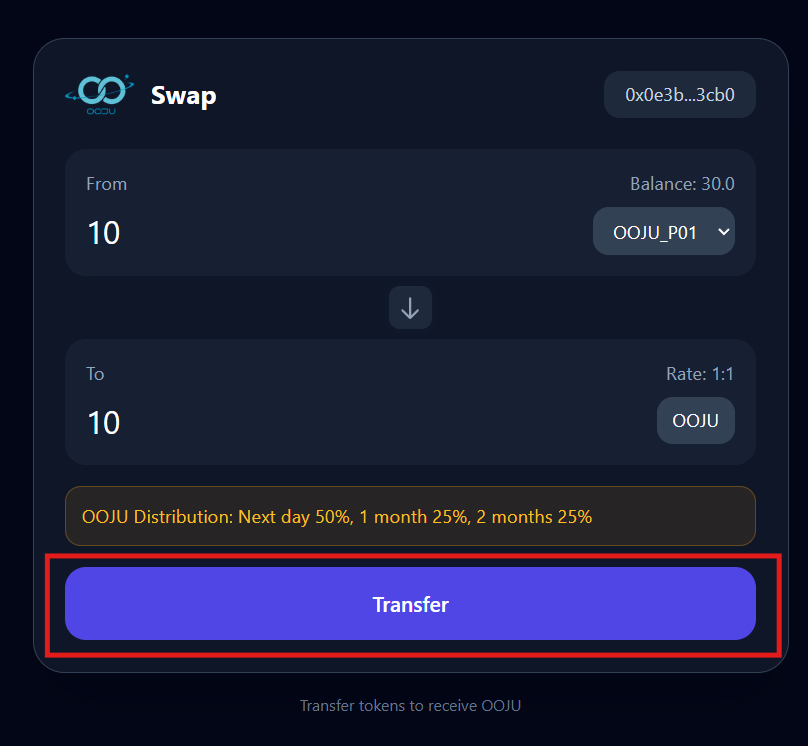
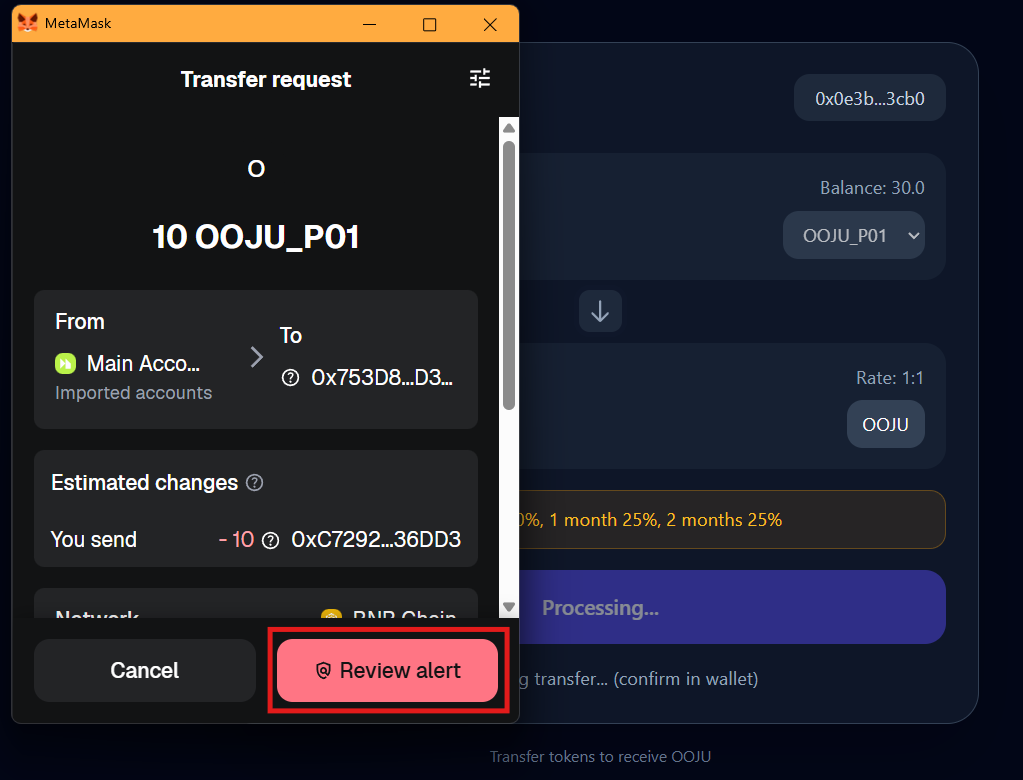
5. Click on Transfer, and your MetaMask wallet will open. If your Wallet doesnt open, click on the wallet icon on your browser or refresh the website.&#x20;

   <div align="left"><figure><img src="https://1601025725-files.gitbook.io/~/files/v0/b/gitbook-x-prod.appspot.com/o/spaces%2FpmTmyDG5fXgRWTNXspUU%2Fuploads%2FK041Fj4vgghR7zcvQ1gv%2Fimage.png?alt=media&#x26;token=01eb6df2-32bf-4f6d-9aac-5f474a731ac0" alt="" width="563"><figcaption></figcaption></figure></div>

6. Click on "Review Alert"

   <div align="left"><figure><img src="https://1601025725-files.gitbook.io/~/files/v0/b/gitbook-x-prod.appspot.com/o/spaces%2FpmTmyDG5fXgRWTNXspUU%2Fuploads%2Fm2agZRJpzXSeubeIxUYB%2Fimage.png?alt=media&#x26;token=107b3398-b63f-4e69-8f52-d2afc5a2b112" alt="" width="563"><figcaption></figcaption></figure></div>

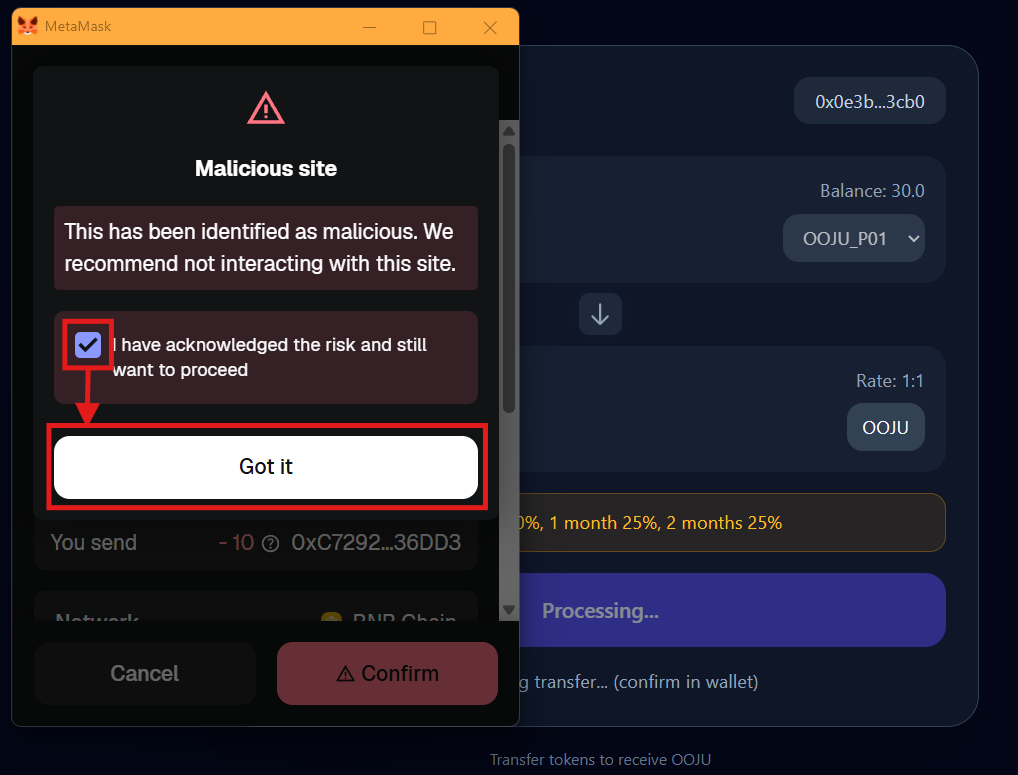
7. Click on the checkbox and then click on "Got it"

   <figure><img src="https://1601025725-files.gitbook.io/~/files/v0/b/gitbook-x-prod.appspot.com/o/spaces%2FpmTmyDG5fXgRWTNXspUU%2Fuploads%2F4EOJlLvFyKcWH95jqDQQ%2Fimage.png?alt=media&#x26;token=9ea6085d-cb61-4aad-820a-c324ebb6b62a" alt=""><figcaption></figcaption></figure>

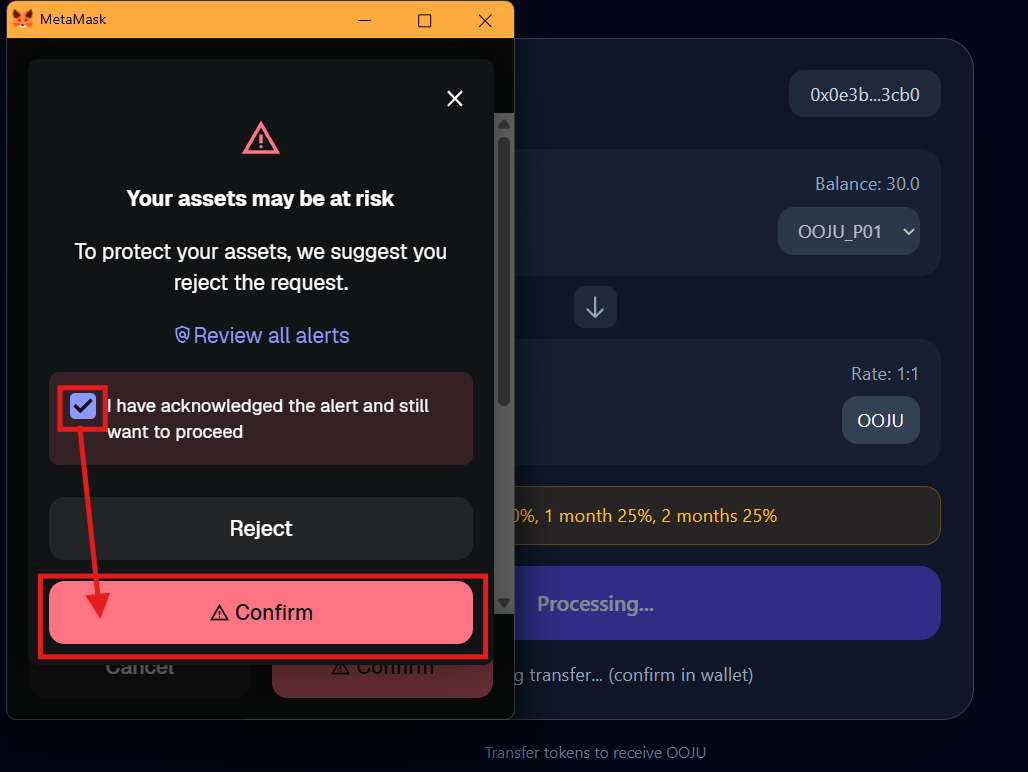
8. Confirm once more, click on the checkbox and click on "Confirm"

   <figure><img src="https://1601025725-files.gitbook.io/~/files/v0/b/gitbook-x-prod.appspot.com/o/spaces%2FpmTmyDG5fXgRWTNXspUU%2Fuploads%2FRqg4cgxzqxUuZaAUgRKF%2Fimage.png?alt=media&#x26;token=9c15a7a8-a105-46ff-b5ed-6e1a3ba472af" alt=""><figcaption></figcaption></figure>

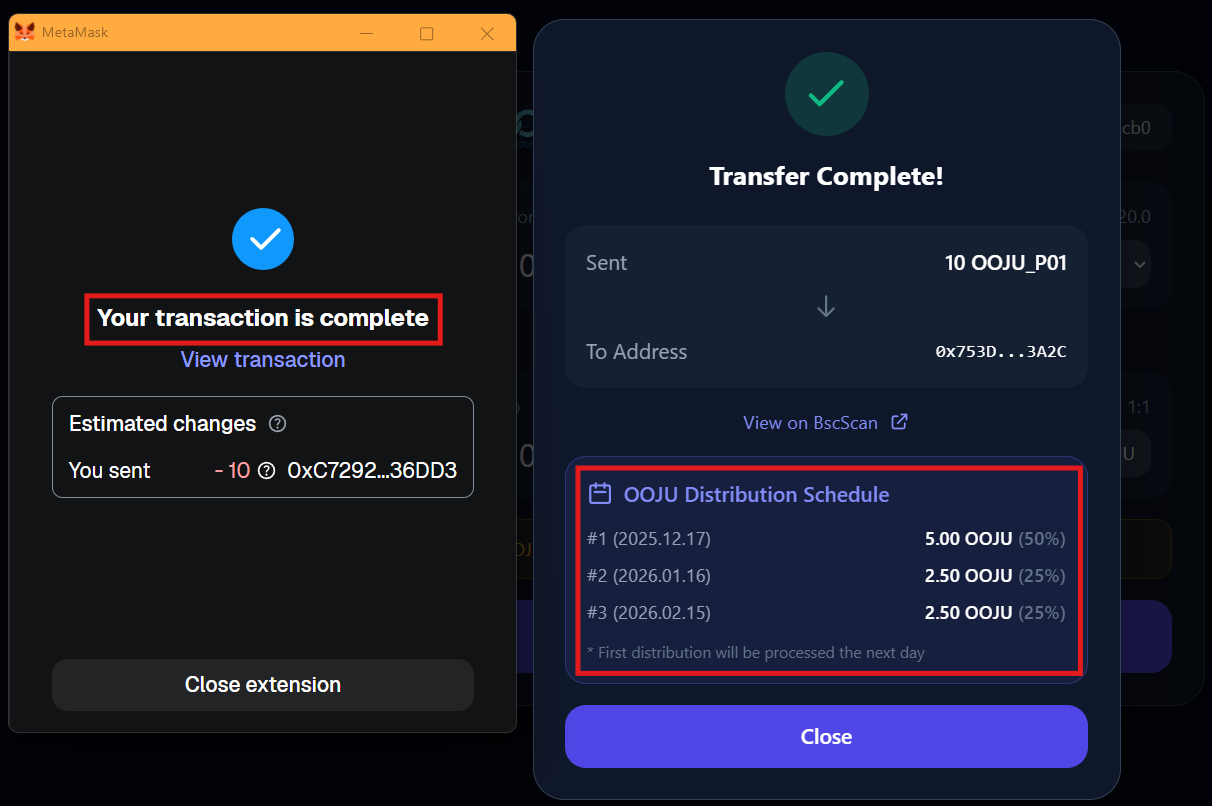
9. The transaction is successfully complete, OOJU has been transferred to the swap address and your OOJU is scheduled to be sent to your wallet on the dates listed below. The first transaction which is 50% of the swapped amount will be available the next day.
   <figure><img src="https://1601025725-files.gitbook.io/~/files/v0/b/gitbook-x-prod.appspot.com/o/spaces%2FpmTmyDG5fXgRWTNXspUU%2Fuploads%2FPBYPQaFvQrAo1cy41G5w%2Fimage.png?alt=media&#x26;token=4920080b-b52c-41f8-b2eb-c12ca90bf5eb" alt=""><figcaption></figcaption></figure>